Hi there!
Let’s gather all those recent inspiring Home Assistant dashboards that you have been working on into one thread.
Show off you creative layouts, and card choices, to hopefully give both new and current users ideas for their own setups!
Let’s inspire one another! 😊
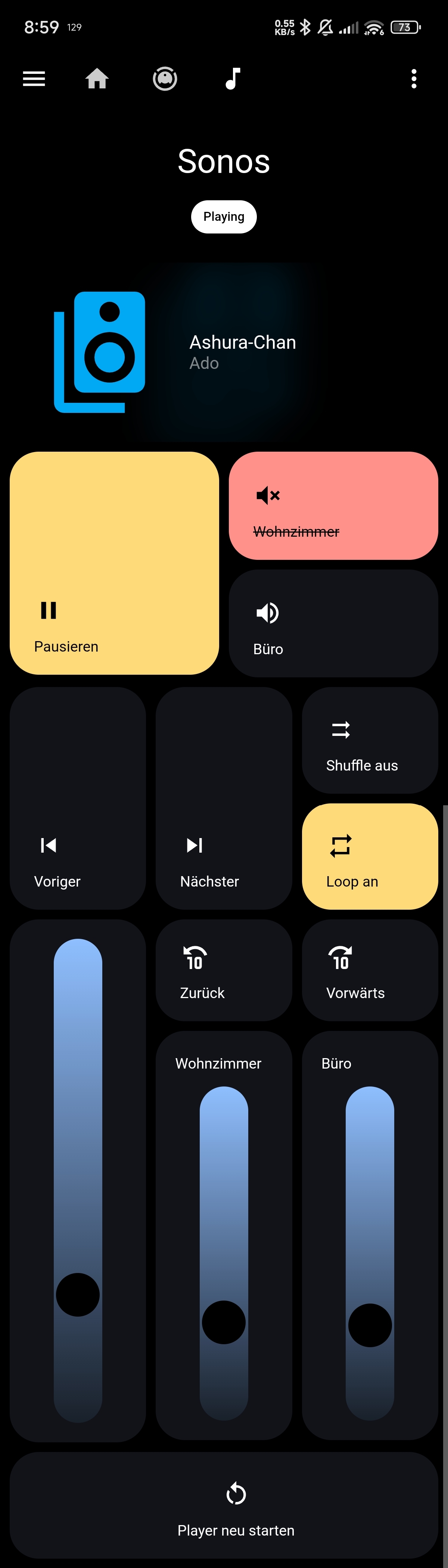
Hey! Just joined the community here, but long time HASS user. This is my mobile dashboard. Mostly bubble cards with a lot of custom styling. I’ve been using the newer UI dashboard since a while and really like the way it works compared to having to do everything manually through YAML.

Wow, that looks super nice! Great job!
Thanks! It’s been a long road of trial and error 😂
nice! what’s that first card you used for the home security?
It’s a custom card actually.
type: custom:button-card entity: alarm_control_panel.master show_state: false show_icon: true icon: mdi:shield-outline show_name: true show_label: true styles: grid: - grid-template-areas: | "n action_card" "l action_card" - grid-template-rows: min-content 1fr card: - overflow: hidden - padding: 1rem - background: var(--big-button-2) - backdrop-filter: var(--frost) label: - justify-self: start - align-self: start - font-family: var(--primary-font-family) - font-size: 1em - font-weight: 500 - color: var(--accent-color) img_cell: - position: absolute - top: 27% - right: 32% - overflow: visible icon: - position: absolute - width: 200px - opacity: 40% - color: var(--accent-color) - rotate: 15deg name: - justify-self: start - font-size: 1.5em - font-weight: 600 - font-family: var(--secondary-font-family) state: - value: disarmed name: Disarmed - value: armed_away name: Armed Away - value: armed_home name: Armed Home - value: arming name: Arming... styles: name: - animation: flash 2s linear infinite extra_styles: | @keyframes flash { 0% {opacity: 100%;} 50% {opacity: 0%;} 100% {opacity: 100%;} } custom_fields: action_card: card: type: custom:button-card styles: grid: - grid-template-areas: "\"item1\" \"item2\" \"item3\"" - row-gap: .5rem card: - padding: .5rem - border: none - border-radius: 1rem - background: var(--base) custom_fields: item1: card: type: custom:button-card entity: "[[[ return entity.entity_id ]]]" show_name: false show_state: false icon: mdi:shield-home styles: icon: - width: 25px - color: var(--text) card: - padding: 10px - border: none - border-radius: 500px - box-shadow: none - background: none state: - value: armed_home styles: card: - background: var(--red) icon: - color: white - animation: rotate 4s linear infinite extra_styles: | @keyframes rotate { from {transform: rotateY(-180deg);} to {transform: rotateY(360deg);} } tap_action: action: call-service service: alarm_control_panel.alarm_arm_home target: entity_id: "[[[ return entity.entity_id ]]]" data: code: "163288" item2: card: type: custom:button-card entity: "[[[ return entity.entity_id ]]]" show_name: false show_state: false icon: mdi:shield-lock styles: icon: - width: 25px - color: var(--text) card: - padding: 10px - border: none - border-radius: 500px - box-shadow: none - background: none state: - value: armed_away styles: card: - background: var(--red) icon: - color: white - animation: rotate 4s linear infinite - value: arming styles: icon: - animation: rotate 4s linear infinite card: - background: var(--peach) - animation: flash 2s linear infinite extra_styles: | @keyframes rotate { from {transform: rotateY(-180deg);} to {transform: rotateY(360deg);} } @keyframes flash { 0% {opacity: 100%;} 50% {opacity: 0%;} 100% {opacity: 100%;} } tap_action: action: call-service service: alarm_control_panel.alarm_arm_away target: entity_id: "[[[ return entity.entity_id ]]]" data: code: "163288" item3: card: type: custom:button-card entity: "[[[ return entity.entity_id ]]]" show_name: false show_state: false icon: mdi:shield-off styles: icon: - width: 25px - color: var(--text) card: - padding: 10px - border: none - border-radius: 500px - box-shadow: none - background: none state: - value: disarmed styles: card: - background: var(--red) icon: - color: white - animation: rotate 5s linear infinite tap_action: action: call-service service: alarm_control_panel.alarm_disarm target: entity_id: "[[[ return entity.entity_id ]]]" data: code: "163288" extra_styles: | @keyframes rotate { 0% { transform: rotateY(0deg); } 20% { transform: rotateY(100deg); } 40% { transform: rotateY(150deg); } 50% { transform: rotateY(180deg); } 70% { transform: rotateY(240deg); } 100% { transform: rotateY(360deg); } } extra_styles: | @keyframes rotate { from {transform: rotateY(-180deg);} to {transform: rotateY(360deg);} } @keyframes flash { 0% {opacity: 100%;} 50% {opacity: 0%;} 100% {opacity: 100%;} }
Not entirely done (a heading is inside the card) and I have redacted some photos. This is the main tablet view. Another page has lights, but this is more interesting I think.
Topmost I have the state of the house alarm, if the cage to the rabbits is open or closed, and whether one of my kids is in school or not.
Weather below that, Icons show whether it’s safe to open the parasol (wind gust speed, cloud coverage and temperature play in here) and if sunscreen is needed (uv index). If a door or window is open, a card is shown. A list of when trash is being picked up, the agendas for the kids and finally the price of energy for the day.

I’d post the AppleHome dashboard here, because it’s amazing, but I don’t want to take any credit for the work the programmer did. Also nothing unique about mine, but it looks amazing.
Over the years, we’ve made a lot of Dashboards. In the most recent iteration, I’ve been using the popular Rounded theme, plus some customizations.
I’ve also tried to get rid of as many elements as possible. 90% of entities I just do not need to see on a daily basis, or only in certain specific situations, so I’m trying to automate that (i.e. only show what I’m actually interested in).

Sure, here is my mobile.

It is adaptive to bigger screens. The top bar becomes a side bar and the room cards get bigger. Doesn’t look great landscaped on my phone, but looks good on a tablet or monitor.

Damn!
Wow, nice job
My WIP dashboard

I have many, many tabs and dashboards, but here are a few.

Oh boy, I can see I really need to get my dashboard game together.
default dashboard (for now!!!) on my phone

I love the Internet Explorer logo 😂
I tried taking longer screenshot. But my phone didn’t allow me to show all.

For anyone wondering. Our home assistant is abour 1.7Gb and has about 4000 entities or so
How do you track (PostNL) packages?
This looks like a mansion haha. I love the energy dashboards you have setup tracking everything from solar to battery power. Very nice!
Nice dashboard. What house battery do you use?