
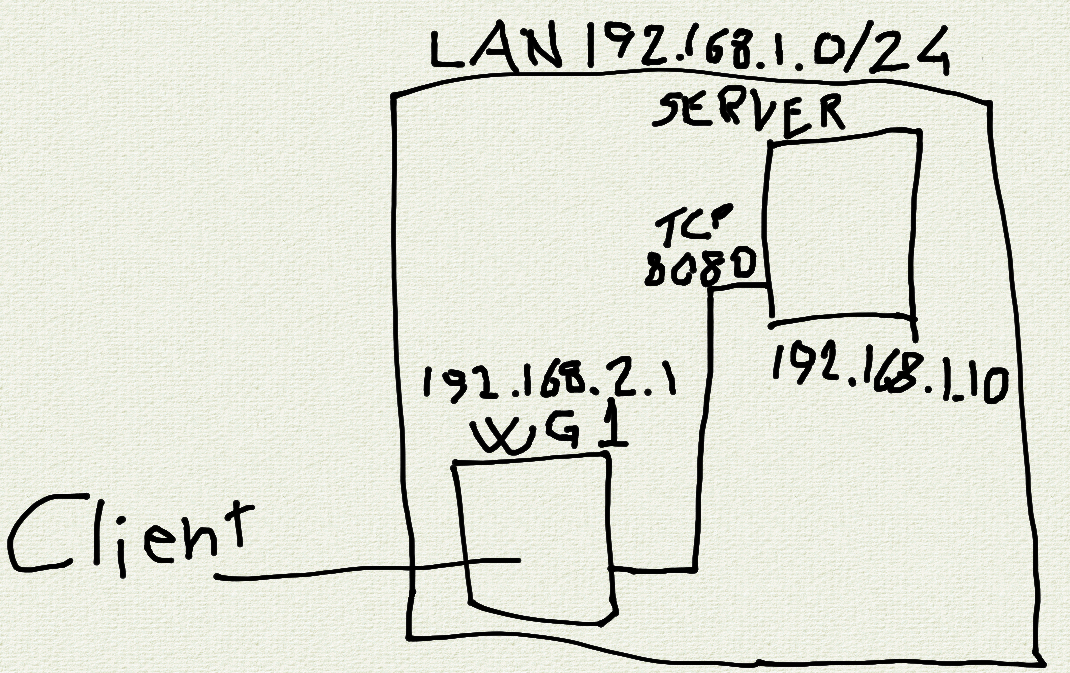
I wanted to share a service I’m hosting, but didn’t feel comfortable just leaving publicly accessible, even behind a reverse proxy. In the meantime I did not want to give access to my whole lan with a VPN, or redirect all internet traffic from a client thru my network. So the idea is to run a WireGuard instance on my OpenWRT router in a completely isolated zone (input, output and forward set to reject on firewall) and then forward a single port from the service host’s. Client is android, so using WG Tunnel and split tunnel just for the relevant app should not impair client’s network access. Initial tests seems to be ok, is there anything I may have overlooked? Please feel free to comment.
- syaochan@feddit.itEnglish7 months
Now I have. Is this a roundabout way to say you did not appreciate my touchpad art? /j
- signalsayge@infosec.pubEnglish8 months
Tailscale would probably be easier for this. Install tailscale on the server and configure only that service available in the tailscale dashboard. I’ve used this method for ssh access to family members devices.
I’m sure you could run the same setup using headscale (tailscale self hosted), it would require a bit more setup though and dynamic dns would probably have to be working.
- syaochan@feddit.itEnglish8 months
I know about Tailscale, but since it’s a commercial service I’m not keen to adopt it and then maybe they stop having a free tier. I’ll look into Headscale instead, I did not know about that before.
卩卄卂丂乇@lemmy.8th.worldEnglish
8 monthsYou don’t really need forwarding as you don’t need NAT here.
A part of the filtering can be done by wireguard by setting the allowed IPs correctly. Just check if only one service is listening on the server port you’ll allow.
Now a question: all without tls right? ;)
- syaochan@feddit.itEnglish8 months
Could you elaborate what you mean with setting the allowed IPs? Yes, without tls.
卩卄卂丂乇@lemmy.8th.worldEnglish
7 monthsApologies for the delay. On the VPN termination point, you have to set the allowed IP addresses. On the case of a client, a /32 is enough. It means that only this IP would be receiving responses. A client with a different IP address would be able to inly send packets, not to get any back, thus not able to get a TCP session. I think it is enough and rhat no additional FW rule is needed.
- syaochan@feddit.itEnglish7 months
Don’t worry, there’s no deadline here. I’m not sure I got it so I’ll try to explain what I understood. You’re saying that I have to set a single IP address for the client, and allow that single address to connect to service on port 8080 on 192.168.10.1 in the firewall, right? I’m not too confident in my ability to configure the firewall, so I thought that completely isolate the subnet 192.168.2.0 and then forward a single port to it was the safe choice.
- frankhe78@feddit.itEnglish8 months
Seems fine with me. I have been playing around with some MikroTik devices doing exactly this. It should also be possible to achieve the same using OpenWRT. You do indeed have to isolate things using different subnets and route certain IP-adresses between those IPv4 subnets. Nothing too complicated.


