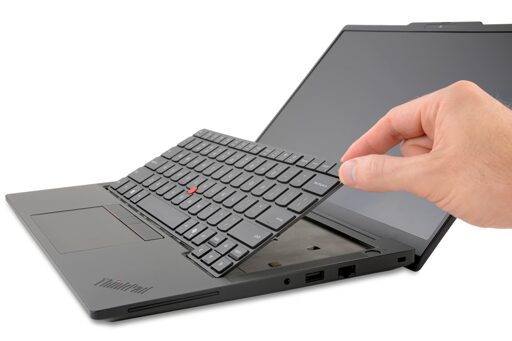
Repair goes mega mainstream with the launch of Lenovo’s new T-series business laptops, which earned our highest honor with a 10/10 repairability score.
I have an X1 Carbon Gen 9 (so a few years old now). I wanted to replace my HDD and they (Lenovo) had videons on how to do it.
I’d say yes. But stick to ThinkPad series. I have an IdeaPad for work and I really which I told my boss to buy a ThinkPad instead. Keyboard has broken twice in 2 years.
Yeah, its less the durability, and more the long standing security issues:
Firmware flaws they didn’t always patch
many vulnerabilities that were known
bundled apps that included known vulnerabilities
Installing software on first boot from hardware (discontinued)
Superfish injected ad traffic which allowed mitm attacks
hardware level backdoors
So most of these things get alleviated since I always wipe new computers and put Linux on them anyways. But the repeated poor decision, security, and anti consumer practices concerns me.
I used to work at a company that bought bulk electronics and refurbished them. Phones, laptops, whatever. Flooded crates of laptops weren’t an issue, nor was human feces.
Anyway, since we weren’t really an official partner of any of the manufacturers, we didn’t have whatever in-house repair guides their own technicians would have. But what we did have was Google. And I’ll tell you what, just google “Lenovo (model name) HMM” (Hardware Maintenance Manual) and you get an excellent official guide, freely available to everyone. For Thinkpads anyway, not sure about Ideapads. Example: Here’s the current gen Snapdragon version of the T14s, on Lenovo’s own website. They seem to keep older ones available too.
But to be fair, HP and Dell also do this for their professional gear.


But I won’t buy anything lenovo, should I finally let that go?
I have an X1 Carbon Gen 9 (so a few years old now). I wanted to replace my HDD and they (Lenovo) had videons on how to do it.
I’d say yes. But stick to ThinkPad series. I have an IdeaPad for work and I really which I told my boss to buy a ThinkPad instead. Keyboard has broken twice in 2 years.
Yeah, its less the durability, and more the long standing security issues:
So most of these things get alleviated since I always wipe new computers and put Linux on them anyways. But the repeated poor decision, security, and anti consumer practices concerns me.
I used to work at a company that bought bulk electronics and refurbished them. Phones, laptops, whatever. Flooded crates of laptops weren’t an issue, nor was human feces.
Anyway, since we weren’t really an official partner of any of the manufacturers, we didn’t have whatever in-house repair guides their own technicians would have. But what we did have was Google. And I’ll tell you what, just google “Lenovo (model name) HMM” (Hardware Maintenance Manual) and you get an excellent official guide, freely available to everyone. For Thinkpads anyway, not sure about Ideapads. Example: Here’s the current gen Snapdragon version of the T14s, on Lenovo’s own website. They seem to keep older ones available too.
But to be fair, HP and Dell also do this for their professional gear.